Showing posts with label Google. Show all posts

Google Turns 10,000 New York Old Phone Booths Into Free SuperFast Wi-Fi Internet

Google has unveiled its new plan to bring Free, Superfast Wi-Fi to cities around the world.
Google is one of the many companies vying to transform New York City's increasingly anachronistic phone booths into Wi-Fi hot spots. (example the Van Wagner)

Google is no stranger to the business of Wi-Fi connectivity. The company has a project called Fiber, which aims to provide revved-up broadband speeds to Internet users. Google also has an ambitious initiative called Loon that seeks to bring connectivity to rural areas via high-altitude, giant Wi-Fi balloons.


The company also provides wireless access around its Mountain View, Calif., headquarters and its office in New York City's Chelsea neighborhood. Last July, Google announced that it would give $600,000 to San Francisco to provide Wi-Fi access to several of the city's parks.

The project was first unveiled in 2012 by then-Mayor Michael Bloomberg as a way to repurpose the city's more than 73,000 phone booths. In October, several of the city's existing contracts with companies that maintain and operate public pay phones will expire, and the city is looking at alternative infrastructure plans. The companies that are trying to take over the pay phones are allowed to charge for phone service -- excluding calls to 911 and 311, the city's informational phone line -- but are barred from charging for Wi-Fi access.


The strategy expands Google's reach -- in turn allowing more people to use the company's products and services. Google declined to comment on the NYC pay phone project.

Sidewalk Labs, a Google-owned company that focuses on improving city living through technology innovations, has announced that the company will roll out free WiFi to everyone in New York City around September this year.

Google-backed Sidewalk Labs will convert over 10,000 New York's old phone booths into ad-supported "Wi-Fi pylons." These booths will offer free wireless Internet access to anyone within 150 feet of radius.


Sidewalk Labs is leading a group of investors acquiring Control Group and Titan, companies working to cover New York City with Free, Superfast Wi-Fi service.

Besides offering free Wi-Fi, the booths are also intended to provide free cell-phone charging, free domestic phone calling and a touchscreen-based information hub that provides you everything you need to know about the city and transit directions.


According to the report, each Wi-Fi pylon will deliver advertising on the sides through Titan's advertising network, which is expected to bring $500 million in ad revenue to the city over the next 12 years.


Wrong send? You can now Undo Send for Gmail on the web

Got wrong send? An email meant for your husband goes to your boss. A message meant for your bridesmaids goes to your mother-in-law. Or the nuclear option: an awkward workplace reply all.

Previously a popular feature in Gmail Labs, and recently added to Inbox by Gmail, today we’re adding 'Undo Send' as a formal setting in Gmail on the web.


'Undo Send' allows people using Gmail to cancel a sent mail if they have second thoughts immediately after sending. The feature is turned off by default for those not currently using the Labs version, and can be enabled from the General tab in Gmail settings.


People currently using the Labs version of 'Undo Send' will have the setting turned on by default at launch.

Release track:
Rapid release, with Scheduled release coming in two weeks


Source: googleappsupdates


Invalid Traffic - AdSense for Content

Today I was checking my adsense account and in my dashboard where it shows your total earnings of this month and your current balance.Under my all transaction section where it displays the transaction history (date and Description) and invoice another row is added and its written :

Invalid Traffic - AdSense for Content  debits 0.66  and then the $173.96 and my balance = 173.30


Expert says..Just as a warning depends on where it appears. If it's just once in a while, it's probably not a big deal. If it happens a lot and a lot of money is getting yanked back, then you want to start looking at your traffic to make sure it's targeted and correct, and also maybe look at your placement to ensure that your ads aren't too close to your navigation or can't be mistaken for it. 

Other opinion is that invalid traffic in this instance refers to invalid clicks (CPC) and invalid impressions (CPM), and as far as I am aware, AdSense does not adjust earnings just because clicks / impressions came from a particular traffic source. For that reason, I wouldn't use the term 'invalid traffic' in relation to traffic source, except perhaps for some specific traffic types, such as PTC, which are artificially generated for the sole purpose to generate ad clicks.


For example, if I have a site targeted to one state in the US and suddenly I start getting a bunch of traffic from Russia that is clicking on ads, then there's obviously something wrong there, no matter how the traffic came to be there.

 I think that even if the bulk of the traffic comes from social networking sites (through personal and social connections and recommendations, rather through search), for example, the site engages with the readers and creates or raises pain points that the advertisers on the site address, then that can represent a good ROI for the advertisers, and that would be a good traffic profile.


'Invalid traffic' includes both clicks and impressions on AdWords ads that Google suspects to not be the result of genuine user interest. This covers intentionally fraudulent traffic as well as accidental clicks and other mechanically generated traffic. Although advertisers are not charged for these clicks or impressions, this traffic may still result in valuable site visits and conversions.

 If the adjustments represent a very small proportion of your earnings, then I wouldn't worry about them: invalid clicks occur every so often.


So I would argue, that while the quality of the incoming traffic profile to the site is important (a traffic profile that's unlikely to convert for the advertisers isn't normally going to turn into a traffic profile that converts), but arguably more important is the quality of the outgoing traffic to the advertisers.


Google will turn your devices into your passwords - Project Vault microSD

Project Vault, designed by Google's ATAP (Advanced Technology and Projects) group, is a secure computer entirely packed onto a microSD card that can be plugged into any system whether it’s a desktop or a mobile phone.

That’s a really catching name announced on the second day of the annual Google I/O developers conference on Friday

The vault is technically a computer though it is not for regular computing. Rather it is a new and secure way to communicate and authenticate without entering passwords.

Today we often choose passwords that we find clever or easy to remember, but Google wants to make the password more personal than we think.

The tiny little chip can authenticate you even before an app or a website asks for your password. In short, Vault will make your primary authentication (which we currently do use passwords) a secondary one, without you having to do anything.


With Project Vault, Google will turn your devices into your passwords. It is capable to encrypt, or scramble, your app is chat messages and provide extra levels of authentication, so your device makes very sure that you are you.

While giving a demo, ATAP team showed how two users can securely chat with each other using Vault-equipped smartphones. Once the chip is installed, the chat application just opens the virtualized two-file system with the read/write I/O.

Vault encrypts the chat messages and then sends it as ciphertext through its encrypted channel, and never sends through the phone so that no one can snoop on you. The phone automatically decrypts the messages, but will never actually be able to see any keys or algorithms on either end.

The company says you will also be able to encrypt video with Vault.

Project Vault has:

  • An ARM-based processor
  • An antenna
  • A near-field communication (NFC) for communicating with nearby devices
  • 4 gigabytes of "isolated, sealed" internal storage
  • Its ultra-secure operating system focused on privacy and data security
  • A suite of cryptographic services


Vault runs a custom-built Real-Time Operating System (RTOS) with a suite of cryptographic services, including hashing, batch encryption, signing and a hardware random number generator, in order to keep your data and messages with friends secure.

Vault works with any operating system -- including Google's Android, Windows, Linux and Apple's OS X -- since essentially it is just a generic storage device to the host computer or phone.

I called the move smarter because here all the work is done by the host without the users having to deal with the configuration of the device, making it as user-friendly as possible.

Project Vault is still "very much in the experimental stage" and in process of being ready for users, but the source code for the system is available on GitHub under an open-source license so that developers can start delving into it.

Google I/O 2015: Keynote, Android M Preview, Develop, Engage, and Earn - Insight

Google I/O is two days of inspirational talks, hands-on learning, and a chance to hear more about Google's latest developer products. 8th annual Google I/O conference, joined by 5,600 developers at Moscone Center, 530 I/O Extended communities around the world, and millions via the I/O Live stream. This year’s event is focused on delivering incredible experiences on mobile and helping developers build successful businesses through these key themes: Develop, Engage, and Earn.


During the keynote, we had a number of announcements that covered the evolution of the mobile platform, tools for Android, iOS, and Web developers, and the push towards more immersive mobile experiences with VR. Here’s a closer look at the news:

Develop

  • Android M Developer Preview — Get an early look at the next version of Android.
  • Google Play services 7.5 — Check out new features like Smart Lock for Passwords, new APIs for Google Cloud Messaging and
  • Google Cast, and the Google Maps API on Android Wear devices.
  • Android Studio 1.3 — Preview Android Studio v1.3, now with improved Gradle build speed, a new memory profiler, and full editing and debugging support for C/C++.
  • Polymer 1.0 — As the first production-ready release for the web components library, we’re also adding new product lines of elements. Features range from toolbars and menus to offline caching.
  • iOS & CocoaPods — Access your favorite libraries via CocoaPods, the official distribution channel for Google SDKs on iOS.
  • Cloud Test Lab — Building on the technology from our acquisition of Appurify, cloud Test Lab automates the testing of your mobile apps.
  • Firebase — Firebase makes it easy to build apps quickly, without spinning up servers or writing server-side code.

Engage

  • App Indexing — Index your app’s content into Google Search, just like you would with a website. Available for Android, and now piloting on iOS.
  • Google Cloud Messaging — As one of the most popular ways to send messages from the cloud to user's devices on Android and Chrome, GCM is now also available on iOS.
  • Engagement on the Web — Access previously unavailable native functionality on the web with push notifications from your mobile website and add to homescreen.
  • Empowering successful global businesses on Google Play — Get new and powerful tools to help you further grow your business, improve decision making based on smarter insights, and engage and retain a valuable user base.
  • Universal App Campaigns coming soon — Set up app install ads with just a few inputs like your budget and the cost you’re willing to pay per user--we take care of the rest.
  • Measure App Installs Ads with Google Analytics — Measure app install campaigns based on engagement and lifetime value. On iOS, Google Analytics is now integrated with 20+ ad networks making it easy to understand how to spend your acquisition budget.

Earn

  • AdMob — Monetize your apps intelligently on a single platform, so you can gain insights about your users, drive more in-app purchases and maximize your ad revenue.

What’s Next

  • Android Nanodegree — Enroll in the industry's first Android Nanodegree, developed in collaboration with Udacity. The curriculum was built from the ground up s to meet the high standard we have for Android development. The Nanodegree covers everything from fundamentals to advanced development skills, as well as Google Play services and Material Design.
  • Cardboard SDK — The Cardboard SDK for Unity now supports both Android and iOS.

Here some my Note at Google I/O

Android M

Today at Google I/O, we announced a developer preview of the next version of Android, the M release. Last year’s developer preview was a first for Android and we received great feedback. We want to continue to give you developers early access to Android so you have time to get your apps ready for the next version of Android. This time with the M Developer Preview, we will provide a clear timeline for testing and feedback plus more updates to the preview build.
 

The Android M release: improving the fundamentals

For the M release, we focused on improving the core user experience of Android, from fixing thousands of bugs, to making some big changes to the fundamentals of the platform:

Permissions - We are giving users control of app permissions in the M release. Apps can trigger requests for permissions at runtime, in the right context, and users can choose whether to grant the permission. Making permission requests right when they’re needed means users can get up and running in your app faster. Also, users have easy access to manage all their app permissions in settings. On M, as a developer, you should design your app to prompt for permissions in context and account for permissions that don’t get granted. As more devices upgrade to M, app permission behavior will be a critical development flow to test.


App links - We are making it even easier to link between apps. Android has always allowed apps to register to natively handle URLs. Now you can add an autoVerify attribute to your app manifest so that users can be linked deep into your native app without any disambiguation prompt. App links, along with App Indexing for Google search, make it easier for users to discover and re-engage with your app.

 Battery - We’re making Android devices smarter about managing power through a new feature called Doze. With M, Android uses significant motion detection to learn if a device has been left unattended for a while. In this state, Android will exponentially back off background activity, trading off a little bit of app freshness for longer battery life. Consider how this may affect your app; for instance, if you’re building a chat app, you may want to make use of high priority messages to wake your app when the device is dozing.

The Android M release: advancing assistance and payments

Now on tap - We are making it even easier for Android users to get assistance with Now on tap -- whenever they need it, wherever they are on their device. For example, if your friend texts you about dinner at a new restaurant, without leaving the app, you can ask Google Now for help. Using just that context, Google can find menus, reviews, help you book a table, navigate there, and deep link you into relevant apps. As a developer, you can implement App Indexing for Google search to let users discover and re-engage with your app through Now on tap.

Speech Recognition Accuracy and Deep Neutral Networks On Google Search.
Example if you say on Google Search " movies this weekend? " it recognize it and it will show movies available now.


Android Pay & Fingerprint - We’ve built on our work with Near Field Communications (NFC) in Gingerbread and Host Card Emulation in Kitkat to develop Android Pay. Android Pay will enable Android users to simply and securely use their Android phone to pay in stores or in thousands of Android Pay partner apps.


With M, native fingerprint support enhances Android Pay by allowing users to confirm a purchase with their fingerprint. Moreover, fingerprint on M can be used to unlock devices and make purchases on Google Play. 

With new APIs in M, it’s easy for you to add fingerprint authorization to your app and have it work consistently across a range of devices and sensors.
These are just a few highlights from the M Developer Preview that we announced today. The M preview will be available for download right after the keynote.


The M Developer Preview includes an updated SDK with tools, system images for testing on the official Android emulator, and system images for testing on Nexus 5, Nexus 6, Nexus 9, and Nexus Player devices. We are excited to expand the program and give you more time to ensure your apps support M when it launches this fall. Based on your feedback, we plan to update the M Developer preview system images often during the developer preview program. The sooner we hear from you, the more feedback we can integrate, so let us know!
To get started with the M Developer Preview and prepare your apps for the full release, just follow these steps:
  1. Update to Android Studio v1.3+ Preview
  2. Visit the M Developer Preview site for downloads and documentation.
  3. Explore the new APIs & App Permissions changes
  4. Explore the Android Design Support Library & Google Play Services APIs
  5. Get the emulator system images through the SDK Manager or download the Nexus device system images.
  6. Test your app with your supported Nexus device or emulator
  7. Give us feedback

Always-on and Wi-Fi with the latest Android Wear update

A new update to Android Wear is rolling out with lots of new features like always-on apps, Wi-Fi connectivity, media browsing, emoji input, and more. Let’s discuss some of the great new capabilities that are available in this release.


Always-on apps

Above all, a watch should make it easy to tell the time. That's why most Android Wear watches have always-on displays, so you can see the time without having to shake your wrist or lift your arm to wake up the display. In this release, we're making it possible for apps to be always-on as well.

With always-on functionality, your app can display dynamic data on the device, even when the app is in ambient mode. This is useful if your app displays information that is continuously updated. For example, running apps like Endomondo, MapMyRun, and Runtastic use the always-on screen to let you keep track of how long and far you’ve been running. Zillow keeps you posted about the median price of homes nearby when you’re house-hunting.

Over 4000 plus  Android Wear apps

Always-on functionality is also useful for apps that may not update data very frequently, but present information that’s useful for reference over a longer period of time. For example, Bring! lets you keep your shopping list right on your wrist, and Golfshot gives you accurate distances from tee to pin. If you’re at the airport and making your way to your gate, American Airlines, Delta, and KLM let you keep all of your flight info a glance away on your watch.

Note: the above apps will not display always-on functionality on your watch until you receive the update for the latest version of Android Wear.

Wi-Fi connectivity and cloud sync

Many existing Android Wear devices already contain hardware support for Wi-Fi, and this release enables software support for Wi-Fi. The saved Wi-Fi networks on your phone are copied to your watch during setup, and your watch automatically connects to those Wi-Fi networks when it loses Bluetooth connection to your phone. Your watch can then connect to your phone over the Internet, even if they’re not on the same Wi-Fi network.

Wayne Piekarski, Developer Advocate


Multi-wearable support

The release of Google Play services 7.3 now allows support for multiple wearable devices to be paired simultaneously to a single phone or tablet, so you can have a wearable for fitness, and another for dressing up. While DataItems will continue to work in the same way, since they are synchronized to all devices, working with the MessageApi is a little different. When you update your build.gradle to use version 7.3 or higher, getConnectedNodes() from the NodeApi will usually return multiple nodes. There is an extra virtual node added to represent the cloud node used to communicate over Wi-Fi, so all developers need to deal with this situation in their code.

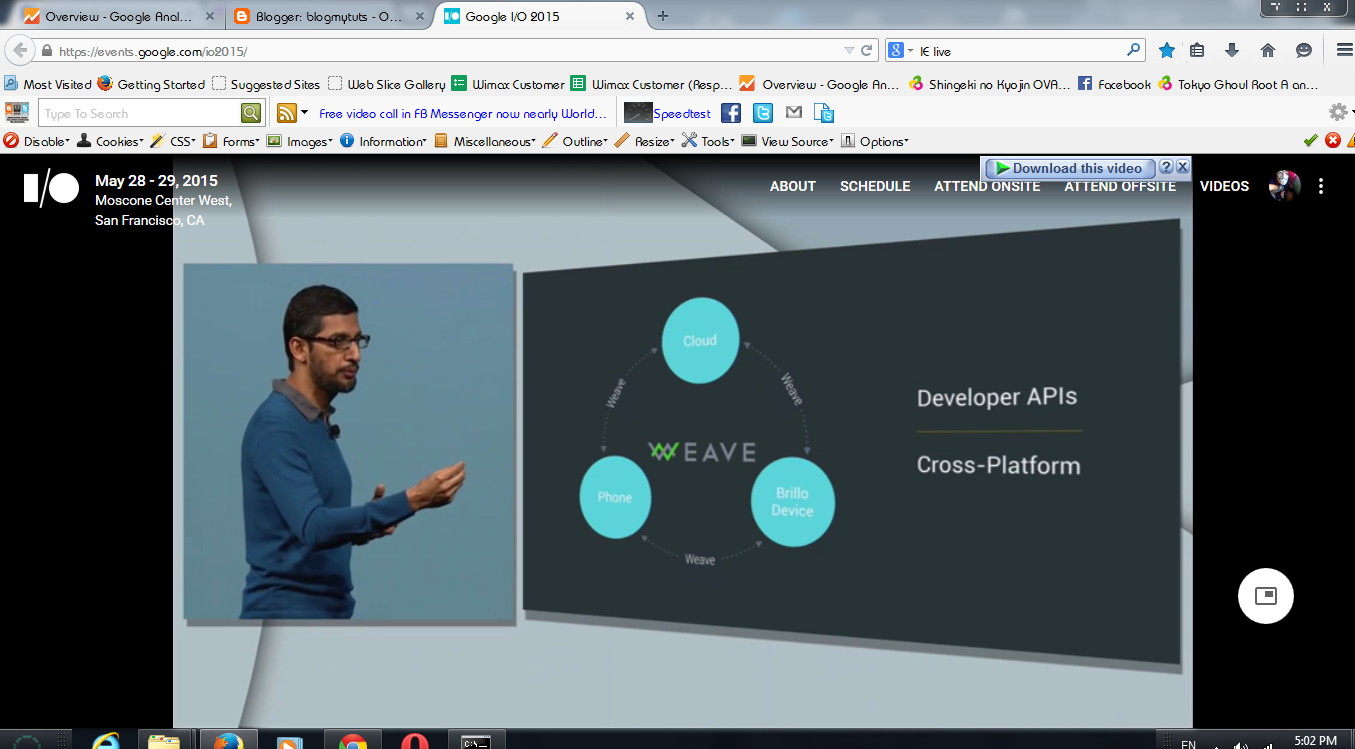
Google is looking forward the possibilities to improve connect and control all in a single device

  WEAVE - a cross platform let different device understand a command function.


Google Photos

 A new product that automatically arrange your photo per days, per weeks, per months even a year.. With Google Photo you can easily find your photos with a pitch of your finger tips.Perfect to find Good Memories...
 A home for all your Photos and Videos

  
Google Photo's - Backup HD quality Photo's up to 16 megapixel and Videos up to 1080p , Unlimited For FREE!! available to iOS and Android Starting Today!


Google Maps Offline - recently Google introduce YouTube offline in some country like India , Vietnam, and Philippines. Now Google start rolling out Google Maps Offline , to reduce mobile data. Now, navigate the real World Offline and Online. Starting later this year. (Polymer 1.0)


+Taylor Savage, Product Manager, Polymer


1.0 version of the Polymer library. Polymer is a new way of thinking about building web applications - a sugaring layer on top of Web Components, making it easy for you to create interoperable custom elements. These elements can then be put together to create app-like immersive experiences on the web.
Since the “Developer Preview” release, we’ve re-written the library from the ground up, focusing on cross-browser performance while keeping the developer-friendly ergonomics. The new library is about 3x faster on Chrome, 4x faster on Safari, and a third less code than in developer preview. And it’s ready to be used in production applications.


Google blocks Chrome extensions not found in the official Web Store

Google will require extensions for its Chrome browser to be installed from its Web Store, a move intended to stop users from inadvertently installing malicious ones.

Google has gradually been changing its policy around extensions to prevent abuse. Last year, it mandated that all Chrome extensions for Windows be hosted in its store, wrote Jake Leichtling, an extensions platform product manager.

The change caused a 75 percent drop in requests from customers asking how to uninstall unwanted extensions, he wrote. It did not apply to the Windows developer channel, but hackers are now using that in order to install extensions, he wrote. Starting Wednesday, all extensions for Windows will have to be hosted in the store, and the same will apply to OS X in July.


Google automatically analyzes extensions for malicious behavior. Most are then published, although some may be held for manual review. It bans extensions that interfere with advertisements, for example, or are spammy.

For development purposes, Google will still allow extensions to be installed locally, as well as forced installs using a group policy for enterprises, Leichtling wrote.

To not disrupt users’ experiences, Google also allows so-called inline installations, where a user appears to install an extension directly from a website, but it is actually hosted at the Web Store.


Lost Your Android Phone? Google Search It!!

Have you lost or forget where did you put Phone?
Instead of searching your phone everywhere, just ask Google where your phone is, and the search engine giant will answer you the exact place where you left your smartphone.

 Google has discharged another highlight to scan for your lost phone or tablet.


 Google unveiled a new feature on Wednesday that lets you search for your Android smartphone or tablet using the search engine on your desktop computer.


How does it work?

Log-in to the same Google account on your desktop computer’s browser that you use on your Android smartphone, but before that make sure you must have the latest version of the Google app installed on your smartphone. Touch Update if not updated.


Now type "Find my phone" into Google's search engine, and that’s it.


If you have more Device than one you can Choose which one your want to locate..


As soon as you press the enter or ALLOW button click Accept button , Google will contact and display a map that eventually shows you a location on the map that is accurate to a certain distance, as for example, the map showed me the location of my smartphone was accurate to 12 meters.


 However, what if your phone is not visible to you?

Google also offers you a Ring button on the map in order to pinpoint your phone.
You just need to click on Ring icon and the search engine giant will ring your smartphone at full volume for up to five minutes. Moreover, once you hand on it, simply press the power button to turn off the ringing.


Known as Android Device Manager can also help you locate and ring your Android devices. 
Tested :P


 Also in case your Android device has been stolen, this feature helps you to factory reset your device remotely and reset the password if the device is recovered or erase its data.

Press Set Lock and Erase  You  can change the screen lock and erase all data


Having Trouble ?


Link your Android phone

Step 1: Update the Google app

  1. On your phone, go to the Google app page on the Play Store.
  2. Touch Update.


Step 2: Turn on Google Now

  1. On your phone, open the Google app .
  2. In the top left corner, touch the Menu icon menu icon > Settings > Now cards
  3. Turn on Show cards.
  4. Turn on Show notifications.


Step 3: Turn on Web & App Activity

  1. Visit the Account History page.
  2. Make sure the switch is on (green/blue).


Visit : https://support.google.com/websearch/answer/6128427?p=find_android&rd=1#findmyphone


Copyright 2011 Gadgets Technology is proudly powered by blogger.com