Showing posts with label Windows. Show all posts

Windows 10 Hero Desktop Image

The latest YouTube video that reveals the default desktop wallpaper Windows 10 will have, and that exacting details that into making it.

Blasting lasers, pumping smoke machines, colored filters and falling crystal dust. Not all desktop images are created equal. Take a look behind the scenes at the making of the iconic Windows 10 image in our collaboration with world renowned, San Francisco-based design director Bradley G. Munkowitz aka GMUNK. - Microsoft


The new design takes the basic Windows logo and shines light through it. Not entirely original for a photo featuring a window, but the resulting image is still cool to look at.


Munkowitz and his team employed camera mapping techniques along with light, haze, lasers, and lens flares to create an image of power generating from beyond the window.

Munkowitz says the basic idea was to treat the logo “as a portal that was allowing us to look into space.” In other words, he let a window be a window.

Microsoft Announcement on Insider Hub Getting the Windows 10 final release on July 29th .


You may also like :


What the famous Windows XP Bliss site looks like, today

Bliss is the name of the default computer wallpaper of Microsoft's Windows XP operating system. It is an image of a rolling green hill and a blue sky with cumulus and cirrus clouds. The landscape depicted is in the Los Carneros American Viticultural Area of Sonoma County, California, United States.

Former National Geographic photographer Charles O'Rear, a resident of the nearby Napa Valley, took the photo on film with a medium-format camera while on his way to visit his girlfriend in 1996. While it was widely believed later that the image was digitally manipulated or even created with software such as Adobe Photoshop, O'Rear says it never was. He sold it to Corbis for use as a stock photo. Several years later, Microsoft engineers chose a digitized version of the image and licensed it from O'Rear.

Recreation by Goldin+Senneby of approximately the same location in November 2006, showing vines covering the area.

  "21st Century Bliss" by Tony Immoos (2010) reportedly "closely resembles the 1996 photograph"[14] but was taken about 14 years later from nearly the same spot.


Over the next decade it has been claimed to be the most viewed photograph in the world during that time.Since it was taken, the landscape in it has changed, with grapevines planted on the hill and field in the foreground, making O'Rear's image impossible to duplicate for the time being. That has not stopped other photographers from trying, and some of their attempts have been included in art exhibits.


How to find the site

Since then, the location of the “Bliss” photo has been disclosed: about here, on Highway 12 (overlapping with Hwy 121) in Sonoma County. If you’re driving from Napa to Sonoma, it’s little more than a mile or so past the magnificent Domaine Carneros. The safest way to visit the spot is to find a spot in town to park, then hike back. But an alternative is to find a place to turn around, then park next to a call box while driving east to Sonoma. 

Google Map Coordinates:  Location    Sonoma County, California, United States
38°15′00.5″N 122°24′38.9″WCoordinates: 38°15′00.5″N 122°24′38.9″W


The Upcoming Windows 10 Wallpaper.:

The latest YouTube video that reveals the default desktop wallpaper Windows 10 will have, and that exacting details that into making it.


The new design takes the basic Windows logo and shines light through it. Not entirely original for a photo featuring a window, but the resulting image is still cool to look at.

Munkowitz and his team employed camera mapping techniques along with light, haze, lasers, and lens flares to create an image of power generating from beyond the window.

Munkowitz says the basic idea was to treat the logo “as a portal that was allowing us to look into space.” In other words, he let a window be a window.


Final release build of Windows 10 starting on July 29th

Microsoft Announcement on Insider Hub Getting the final release on July 29th

Windows Insiders running the Windows 10 Insider Preview (Home and Pro editions) with their registered MSA connected to their PC will receive the final release build of Windows 10 starting on July 29th. This will come as just another flight. I’ve gotten a lot of questions from Windows Insiders about how this will work if they clean installed from ISO. As long as you are running an Insider Preview build and connected with the MSA you used to register, you will receive the Windows 10 final release build and remain activated. Once you have successfully installed this build and activated, you will also be able to clean install on that PC from final media if you want to start over fresh.


If you are running the Enterprise edition of the Windows 10 Insider Preview, to upgrade to the final release of Windows 10 Enterprise you will need to download and activate it from Volume Licensing Service Center. As a reminder, the Enterprise edition of the Windows 10 Insider Preview is not eligible for the free upgrade offer and can be upgraded to the final release of Windows 10 through an active Software Assurance agreement. 

Here comes Microsoft Edge!
In the next build we release to Windows Insiders in the Fast ring, the “Project Spartan” name will officially change to Microsoft Edge. One result of this naming means that the Microsoft Edge app has a new app ID. This will cause any favorites, cookies, history and Reading list items that you had saved in the Project Spartan app to be lost after upgrading from a previous Windows 10 Insider Preview build. If you want to keep these, you will need to back up your favorites before the next flight! To save your favorites, follow these steps before upgrading to the next build we release (do it now):
  • Copy your favorites from %localappdata%/Packages/Microsoft.Windows.Spartan_cw5n1h2txyewy/AC/Spartan/User/Default/Favorites.
  • Save them to %userprofile%/Favorites.
  • After upgrading to the next build open Microsoft Edge, choose Settings, and you’ll see an option to import favorites from another browser. Choose Internet Explorer to import the favorites you saved in your %userprofile% directory into Microsoft Edge.


-Insider hub

They also announce Windows 10 Mobile Insider Preview build for Windows Insiders on the Fast ring today – Build 10136.

There are a couple of things that you’ll need to pay close attention to in order to upgrade to this build. The first is that we are only offering it to phones that are running Windows Phone 8.1 and opted in to the Windows Insider Fast ring. What this means for you:
  • If you are running the previous build offered to the Fast ring (10080) and you want to get this build you will need to go back to Windows Phone 8.1 via the Windows Phone Recovery Tool first. Once you’re up and running on Windows Phone 8.1, go to the Windows Insider app and select Insider Fast again. This is required because of a migration bug affecting upgrades from 10080 to this build so we are not supporting that upgrade path. We know this is a little bit painful but we didn’t want to make you wait any longer to get a new build and decided (with help from Windows Insiders following me on Twitter) not to hold for those migration issues to be fixed. Some of you previously had to go through 2 “hops” to get to the latest build on your phone. We’ve made this better and you will be able to upgrade directly to the latest build in a single hop regardless of which Windows Phone 8.1 build you’re starting from.
  • If you’re on build 10080 and don’t want to flash back to 8.1 to get this build, you don’t have to do anything. You won’t be offered this build but your phone will still be configured for the next one, and we do expect the next build to have the migration issue fixed so you’ll be able to upgrade directly.

For those of you that do choose to make the jump to this build it is SUPER IMPORTANT TO READ THIS: At the end of the upgrade the Lock screen will appear frozen without the date and time for up to 10 minutes. Please be patient and let it sit – eventually the date and time will appear and it will allow you to unlock your phone. There is a post-upgrade migration status screen missing, which normally would show you that it was making progress. If you get impatient and restart or mess with locking/unlocking your phone, you’ll wind up in a funky state – so just relax and let it do its thing.
More details can be found in Gabe’s blogpost here


You may also like to read:

Finally Microsoft bringing Cortana to Android and iOS

Much anticipated as SIRI rival, voice assistant command Cortana from Redmond giant Microsoft is finally going to launch for Android and iOS user. The voice assistant command is already available for Microsoft user. This marks the first time any of the key virtual assistant programmes have adapted onto other another OS.

Many dedicated application are launching in the App Store and Google Play Store giving you the same abilities as Windows Phone including flight tracking and reminders.
A few features don’t make the jump to the platform as the app can’t tap into the OS as easily, so you’ll lose hands-free activation and options to launch apps directly.
Finally Microsoft bringing Cortana to Android and iOS

http://www.gadget-technolog.blogspot.com/2015/06/microsoft-cortana-digital-assistant.html

Hey Cortana: The Cortana Notebook facility, which remembers all your history and preferences, allows to sync up across all your devices though so if you use both a Android or a Windows Phone and it’ll remember everything.


It’ll be coming to Android at some point toward the end of June whilst those with iPhones are only being told it’s launching later this year.

The company has also shared a Phone Companion Windows 10 app to help sync your Android, iOS and Windows Phone to your computer.


Office 2016 is available for Insiders to preview on Windows 10

Office 2016 is available for Insiders to preview on Windows 10. Check out new features like: Modern attachments in Outlook that make it easy to attach files from OneDrive and automatically configure permission for the recipients—without leaving Outlook; real-time co-authoring in Word; improved Power Pivot and One-click forecasting in Excel; and Tell Me, a new tool available in Word, PowerPoint, and Excel that serves up the commands you need by simply typing what you want to do.

As always, we truly value your feedback – and there are multiple ways to tell us about your experience. You can respond directly using feedback tools within Office 2016 Preview or post to the Insider forums. You can also send us feedback and report problems through the Windows Feedback app.


Download the Office 2016 Preview today

Product key for the Office 2016 Preview

NKGG6-WBPCC-HXWMY-6DQGJ-CPQVG

http://products.office.com/en-us/office-2016-preview


Toshiba's Windows 10 laptops will feature a dedicated Cortana button

The Cortana key will be on all of Toshiba's Windows 10 PCs—“across the board, top to bottom,” according to Jeff Barney, the general manager and vice president in charge of Toshiba America’s PC business. Toshiba's Windows 10 laptops will feature a dedicated Cortana button, for launching Microsoft's digital assistant from your keyboard.

The key will sit in the upper left area, near the function keys, he said. Triggering it will launch Cortana, Microsoft’s digital assistant.


But on both the phone and the PC, Cortana’s ability to “actively listen” has been problematic, with difficulty picking up and reacting to the use of the “Hey Cortana” phrase that triggers it. In practice,
it's been far more successful when manually triggered.

2014 active listening was added to Cortana, enabling it to be triggered with the phrase: “Hey Cortana,” even across the room and without the need to touch the phone. After the trigger phrase is spoken, Cortana can be controlled normally for tasks like setting a reminder, asking a question, or launching an app. 

 If a user wants to use the Cortana feature on Windows 10, he or she has either had to tap the Cortana icon on the screen or move the mouse to trigger the service. Placing a dedicated Cortana button on the keyboard is a smart idea, especially if the service proves to be a hit.  Frankly, I’d be willing to bet that Microsoft also releases a mouse that does the same thing. (Logitech, a rival peripherals maker, declined to comment.)

The idea behind the dedicated Cortana button, Barney said, is to make sure that “Cortana is listening when you want it to.” The company has added high-fidelity array mics to its PCs to improve Cortana’s ability to understand what you say.


One small click for Toshiba, one giant leap for the keyboard

A dedicated Cortana key would be one of the more significant changes to the keyboard since the Windows key was added at about the time Windows 95 was introduced, in 1995. Although Microsoft added touch support for Windows 8, most external monitors still don’t support it, leaving the mouse and keyboard still as the most popular ways of interacting with your PC.

Voice commands could help change that. Even with a keyboard dock, a dedicated hardware Cortana button would be within easy reach of a PC user’s hands. 

(IDG News Service reporter Blair Hanley Frank also notes that the Windows key + C combination also launches Cortana.)

I tried it personally and it launch Cortana  :)


As Bob O’Donnell of TECHnalysis Research points out, Toshiba is a niche PC vendor—fifth in the United States, with a 6.5 percent share, according to IDC—that could use an idea like this to distinguish itself from the competition. And the company may do just that: So far, no other PC vendor, including Hewlett-Packard and Dell, have publicly indicated that they, too, plan to use a hardware-based Cortana button.


Ask Toolbar will be marked as “Unwanted Software” (or Malware) by Microsoft’s Security Tools

Microsoft security products will detect programs with browser search protection functionality from June 1, 2015.

Non-compliant programs that exhibit such functionality will be detected by our software signatures that look for browser search protection code. Any program using code that can potentially perform search protection may be detected, regardless of whether the code is active.

To avoid detection, developers should remove any search protection code from their programs, regardless of whether it is functional or not.

We’ll be working with search protection developers and vendors who have completely disabled search protection functionality from their programs in alignment with our evaluation criteria.

Developers and vendors can email mpcreply@microsoft.com to start this process. They should provide links to side-by-side downloadable samples of:

    Any programs with fixed behavior that does not exhibit search protection functionality, but has inactive, dormant search protection code.
    Any older programs that are non-compliant with our evaluation criteria.

MMPC  help reduce the risk of having programs with search protection functionality turned off, but still containing non-compliant code, being detected as developers work on completely removing the non-compliant code.

Ask Toolbar  will be marked as “Unwanted Software” (or Malware) by Microsoft’s security tools Microsoft previously warned it would take action against software that tries to prevent users from changing their browser’s default search engine.

Ask Toolbar has its own special annoyances. When installed it switches your browser’s default search provider to Ask.com, and when you try to switch away it attempts to prevent you from doing so with a pop-up warning. If you’re not careful the toolbar can also reappear the next time you update Java.


Ask’s Toolbar has managed to live on as software bundled with Oracle’s Java for Windows. In March, Oracle also extended the Ask Toolbar download to Macs.

Bundleware is bad enough since even veteran PC users can be tricked into installing unwanted software—especially when you’re multitasking.

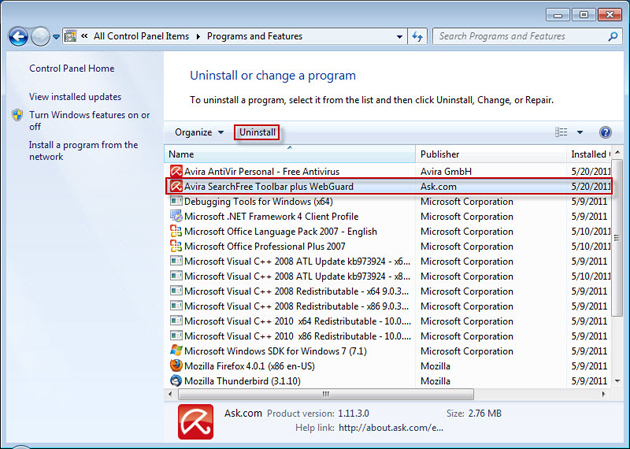
Example is Avira bundle with Ask Toolbar.


Microsoft warned that as of June 1 any program containing search protection functionality—code that tries to stop you from changing your browser or default search settings—would be treated as malware.

It appears Microsoft made good on its promise. Microsoft’s Malware Center now lists the Win32/Ask Toolbar as posing a “High threat to your PC.” The Ask Toolbar entry was first published in February, but was updated on Tuesday.

Microsoft’s security products including Windows Defender on Windows 8 and up, and Microsoft Security Essentials for Windows 7 and Vista can now detect and remove the toolbar.


{source} : http://blogs.technet.com/b/mmpc/archive/2015/05/26/detection-changes-search-protection-code.aspx


How to Enable Windows Cortana Outside United States

How to Enable  Windows Cortana?

Cortana is Disabled when you set your Device Language and  Region outside United States.
Although Cortana Search will work in all languages. Microsoft has, however, promised to make improvements in future builds, adding new capabilities and more languages.

Cortana is only available for the US and English language , so the trick here is set your  Language and region to US and English Language.


Go to Notification on the rightside button near the clock and date Go or click  All Setting Find Time and Language 


To Enabled Cortana You must set  Region and Language to United State and Enable your Location.


Enable  Location on Privacy Settings.


 After you set your Language  and Region you can now  Turn On  your Cortana


NOTE: When you Enable Cortana  it collects your information  Accept  if you Agree.
And make sure you have Microsoft account.


To Activate Cortana you must say the magic  word  "Hey! Cortana " and she will start responding to you.. 

In 2014 active listening was added to Cortana, enabling it to be triggered with the phrase: “Hey Cortana,” even across the room and without the need to touch the phone. After the trigger phrase is spoken, Cortana can be controlled normally for tasks like setting a reminder, asking a question, or launching an app.


  You can also Launch Cortana by Pressing Windows Logo + C on Keyboard.


You can ask here to tell a joke , what is the time and weather and soon..
You can command her a like Play Music,  Open This PC and Search the Web.

Cortana si connected with Sparta Browser   so everything you want to search  it will open it on Sparta Browser or the Edge  with Bing Search Engine..

Cortana is also link with   like when you select a word on Sparta browser  on latest Windows 10 build 10130 you can ask Cortana.


List  of Command for Cortana  I Tested

1. What is your name?
2. How old are your?
3. Guest what?
4. What is my name?
5. Who invented you?
6. What is the Time?
7. What is the weather today?  or What is the Temperature?
8. Your Beautiful.
9. Tell me  a Joke  or Tell me another joke.
10. Open this PC.
11. Play Music
12. Open Network Remote Connection
13. Open Network.
14. Where do you came from ?
15. Where are you?
16. Open Google Chrome ( or anything )
17. Open System Configuration  or Open System Information.
18. Wake me in one minute.
19. Dismiss Alarm  or Stop Alarm 
20. Where I am? 
21. How old is Hulk Hogan? (tell any name)
22. Who is Kanya West?
23. Who is the President of the Philippines? (any country)
24. What do you know? (ask her if you have no idea )
25. When is New Year? ( ask any event )


WATCH MY VIDEO:


Testing Microsoft Cortana on Windows 10
Posted by Blogmytuts.blogspot.com on Sunday, 7 June 2015


Microsoft Cortana - Digital Assistant

Microsoft Cortana is an intelligent personal assistant developed by Microsoft for Windows Phone 8.1, Microsoft Band, and coming to Windows 10,iOS, and Android.

It is named after Cortana, an artificial intelligence character in Microsoft's Halo video game series, with Jen Taylor, the character's voice actress, returning to voice the personal assistant's US-specific version.


Cortana was demonstrated for the first time at the Microsoft BUILD Developer Conference (April 2–4, 2014) in San Francisco.It has been launched as a key ingredient of Microsoft's planned "makeover" of the future operating systems for Windows Phone and Windows. As of 2015, Cortana is available as a beta to all users of Windows Phone 8.1  and Windows 10 Preview in the United States (US English), China (Mandarin Chinese), and the United Kingdom (UK English). Users in certain countries can also choose to opt-in to the alpha for the English, French, German, Italian, and Spanish versions of Cortana as of August 2014.


In 2015 Microsoft announced the availability for Windows 10 desktops as part of merging Windows Phone into the operating system at large. On the 26th of May, 2015 Microsoft announced that Cortana would also be available on other mobile platforms. An Android release is set for June 2015 followed by an iOS release later in the year.

You Can Read About Window 10  with Cortana Here :
http://www.gadget-technolog.blogspot.com/2015/06/windows-10-blogmytuts-review.html

Features:

Cortana's features include being able to set reminders, recognize natural voice without the user having to input a predefined series of commands, and answer questions using information from Bing (like current weather and traffic conditions, sports scores, and biographies).

Windows 8.1's universal Bing SmartSearch features are incorporated into Cortana, which replaces the previous Bing Search app which is activated when a user presses the "Search" button on their device.

Cortana also includes a music recognition service. Cortana can also roll dice and flip a coin by asking the commands "roll a die" (one die), "roll the dice" (two dice), and "flip a coin",Concert Watch is a feature that helps Cortana determine which bands or musicians you are interested in by monitoring your Bing searches.

Cortana also integrates with the Microsoft Band for Windows Phone devices if connected via bluetooth.On the Microsoft Band Cortana can make reminders and bring phone notifications.

Hey Cortana

Since the Lumia Denim series, launched in October 2014, active listening was added to Cortana, enabling it to be triggered with the phrase: “Hey Cortana,” even across the room and without the need to touch the phone. After the trigger phrase is spoken, Cortana can be controlled normally for tasks like setting a reminder, asking a question, or launching an app. Some devices from the United Kingdom by O2 have received the Lumia Denim update without the feature but this was later clarified as a bug and Microsoft had since fixed it.

Cortana also integrates with services like Foursquare to provide restaurant and local attraction recommendations

 WATCH MY VIDEO:


Testing Microsoft Cortana on Windows 10
Posted by Blogmytuts.blogspot.com on Sunday, 7 June 2015


How to Enable  Windows Cortana Outside United States?

Cortana is Disabled when you set your Device Language and  Region outside United States.

Visit My Tutorial : http://www.gadget-technolog.blogspot.com/2015/06/how-to-enable-windows-cortana-outside.html


Windows 10 Blogmytuts Review

Microsoft in late 2014 took the wraps off the Technical Preview of its next Windows operating system, and in doing so it took everyone by surprise. We expected the next generation of Windows: we just didn't expect it to be called Windows 10. None the less here is Windows 10: the next Windows OS for PCs and laptops, smartphones and tablets. And, indeed, an OS for servers and all points in between.

Microsoft execs said that Windows 10 is built from the ground up for a world in which mobile- and cloud computing are key. They also told us that Microsoft was committed to making Windows 10 friendly for the enterprise, ideal for keyboard and mouse users, but also optimised for touch. Oh, and Windows 10 will put the same interface on devices with displays ranging in size from 4in to 80in. 'One product family, one platform, one store,' says Microsoft. 


 Installing method similar to previous Windows 7 you can create bootable USB Flashdrive or Burned it on a DVD disk.


 Link: http://www.gadget-technolog.blogspot.com/2015/06/how-to-create-windows-10-technical.html


During the Installation your Monitor would be  Pitch Black.... 


The Latest  Build I tried is build 10130 for my old Dell Laptop. The First DEMO Windows 10 Preview  built Running on 9841 release in October 2, 2014,  So I can say that  build 10130 is on matured state and it will continue to update via regular Windows update. I think yesterday they release new build 10134.

The installation is less than 20 minutes on old USB port 2.0


Windows 10 Preview is already activated after you install.


Notice , there No "MY COMPUTER"  here  they change it to " This PC". Default icon are new and simple.


A fresh installed Windows 10 takes  less than 9 Gig of the disk drive.


Windows 10 is running on Direct X  version 12.


I like the Notification is like the notification on mobile OS , Pop out like notification on Android Device :)


On the Notification You can see Tablet mode, so if you have  Microsoft Surface PC/Laptop or Asus Netbook tablet hybrid  you can easily switch it to Tablet Mode. Windows 10 is really flexible in all device.


Windows 10 has  Built in  Antivirus just like the late Vista Version  "Windows Defender" on other version like XP and Windows 7 this is name as "Microsoft Security Essential".


The Startup Search  is a Two in one, you can search locally on your Computer or  on the Web.


This is  where the Windows Cortana Digital Assistant  like Google Now and Apple Siri  can be activated..
Microsoft Cortana is an intelligent personal assistant developed by Microsoft for Windows Phone 8.1, Microsoft Band, and coming to Windows 10,iOS, and Android.

It is named after Cortana, an artificial intelligence character in Microsoft's Halo video game series, with Jen Taylor, the character's voice actress, returning to voice the personal assistant's US-specific version. 


To Enabled Cortana You must set  Region and Language to United State and Enable your Location.


 After you set your Language  and Region you can now  Turn On  your Cortana


To Activate Cortana you must say the magic  word  "Hey! Cortana " and she will start responding to you .. (HandsFree) without touching any key.


 May First  Command  is  " Tell me a joke!"

And she responds...


Here is my Video talking with Cortana , She really different from others Digital assistant because Cortana has a Personality


Testing Microsoft Cortana on Windows 10
Posted by Blogmytuts.blogspot.com on Sunday, 7 June 2015


Learned More  About Cortana Visit: http://www.gadget-technolog.blogspot.com/2015/06/microsoft-cortana-digital-assistant.html


We know there is 3D Printing available already Windows 10 comes with 3D Builder apps smile emoticon create your own 3D object . Go to a 3D printing shop to print tongue emoticon ..


 Learned more about 3D Builder apps : http://channel9.msdn.com/Blogs/3D-Printing/3D-Builder-User-Manual


Windows 10 Command Prompt  Copy and Paste Keyboard Shortcut is Enabled.


 New Task View.


Project Spartan Browser or Microsoft Edge.


Cortana si connected with Sparta Browser   so everything you want to search  it will open it on Sparta Browser or the Edge  with Bing Search Engine..

Cortana is also link with   like when you select a word on Sparta browser you can ask Cortana.


 The old Internet Explorer is on Windows Accessories.


The beta Store and Xbox are working... I tried to install apps like Minion Rush!! Is like you have a Bluestack  (Android Emulator on PC)


The Music App  is Working too.... They update  it now you can sync Music..


On Windows 10  there is an Option  "Mount"  when you right click  ISO file.. Now you can Open  the ISO on Virtual Disk  directly without any third Party Software..  Windows 8.1 also support this function..


To get the latest update on Windows 10 click the Gear "All Settings" on Notification.


Then click the Advance Option select  "Fast"


They always  send you update specially on bug...

You can send  Feedback via  insider to help Windows 10 better..
Example here  I found bug on Windows ICS (Internet Connection Sharing) I was creating Hotspot for my Android Devices..


Older Post ►
 

Copyright 2011 Gadgets Technology is proudly powered by blogger.com